
How to Manage Multiple WhatsApp Business Numbers in One Inbox
WhatsApp has become an important communication channel for businesses that want to stay connected with their customers. From handling product enquiries and sharing quotations to providing support and coordinating orders, businesses use WhatsApp for several activities throughout the customer journey.
For a small business, managing conversations through a single WhatsApp Business number may be relatively straightforward. However, as the business grows, communication requirements often become more complex. Different departments may need dedicated contact numbers, multiple branches may communicate with their own customers, and sales representatives may handle enquiries from different locations or business divisions.
Over time, a company may find itself managing several WhatsApp numbers, each receiving customer messages independently. While this arrangement helps separate communication responsibilities, it can also make it difficult to maintain visibility, coordinate teams, and ensure that enquiries are handled consistently. A customer may contact the sales number for product information, reach out to another number for an order update, and later contact the support team for assistance. If these conversations are managed through separate inboxes, employees may need to switch between accounts or manually coordinate with other departments to understand the customer’s requirements.
This is where managing multiple WhatsApp Business numbers in one inbox becomes valuable. Instead of treating every WhatsApp number as an isolated communication channel, businesses can use a centralized system to manage conversations across their connected numbers while maintaining the identity and purpose of each number. Understanding how this works, what technology is required, and how to organize conversations effectively can help growing businesses build a more structured approach to WhatsApp communication.
Why Do Businesses Use Multiple WhatsApp Business Numbers?
Businesses often begin with one WhatsApp number and introduce additional numbers as their communication requirements expand. For example, a retail business may initially use a single number for product enquiries, order confirmations, and customer support. As its customer base grows, the business may introduce a separate support number so that sales enquiries and existing customer requests can be handled by different teams.
Similarly, a company operating across multiple locations may maintain dedicated WhatsApp numbers for individual branches. Customers can contact the location they are familiar with, while employees manage enquiries relevant to their region. Other businesses may use different numbers for wholesale and retail customers, marketing campaigns, service departments, or individual business divisions.
There are several legitimate reasons for this approach. Separate numbers can help businesses maintain distinct contact points, organize departmental responsibilities, and provide customers with relevant communication channels. However, the operational challenge begins when each number is managed independently.
A business may have five WhatsApp numbers, but if those numbers are accessed through separate devices, accounts, or disconnected inboxes, managing communication can become increasingly difficult. The problem is not necessarily the number of WhatsApp accounts. It is the lack of a coordinated system for handling the conversations they receive.
What Are the Challenges of Managing Multiple WhatsApp Numbers Separately?
Managing several WhatsApp numbers without a centralized process can create challenges that become more noticeable as enquiry volume increases.
- Limited Visibility Into Customer Conversations: When different departments or branches manage their own WhatsApp accounts, business owners and managers may struggle to understand what is happening across customer conversations. For example, the sales team may be receiving enquiries through one number, while the service department handles customer requests through another. If both teams use separate inboxes, management may need to request individual updates to understand conversation volumes, pending enquiries, or unresolved issues. This can make it difficult to identify which teams are receiving the most enquiries and where additional attention may be required.
- Switching Between Different Accounts: Employees responsible for monitoring multiple WhatsApp numbers may need to move between different accounts, devices, or browser sessions. This becomes inconvenient when messages arrive simultaneously across several numbers. For instance, a manager overseeing three branches may need to check each branch’s WhatsApp account separately to review customer conversations. Although this arrangement may work when enquiry volumes are low, it becomes less practical as the business grows.
- Difficulty Assigning Conversations: When multiple employees manage the same WhatsApp number, it may not always be clear who is responsible for responding to a particular customer.One employee may assume another team member has already replied, while the second employee may be unaware that the enquiry requires attention. When several WhatsApp numbers are involved, this problem can become more complicated because responsibility is divided across different teams and departments. Without clear conversation assignments, businesses may experience delayed responses, duplicated efforts, or missed enquiries.
- Inconsistent Customer Experience: Customers expect businesses to understand their requirements and provide relevant assistance. However, when communication is separated across multiple WhatsApp numbers, employees may not have access to information from earlier interactions. For example, a customer may have discussed product requirements with the sales department and later contact support regarding the same purchase. If the support team cannot access the relevant context, the customer may need to repeat information that was already shared. A lack of coordination between departments can make communication unnecessarily repetitive.
- Difficulty Monitoring Team Performance: Businesses may want to measure response times, conversation volumes, and employee workloads across their WhatsApp numbers. When each number operates independently, collecting this information may require manual reporting from different departments. As a result, managers may have limited visibility into how customer enquiries are distributed and whether communication processes are working effectively. These challenges explain why businesses with multiple WhatsApp numbers often need more than a collection of separate inboxes.
Can Multiple WhatsApp Business Numbers Be Managed in One Inbox?
Yes. Businesses can manage conversations from multiple WhatsApp Business numbers through a centralized inbox using a compatible customer communication platform and supported WhatsApp Business Platform connections.
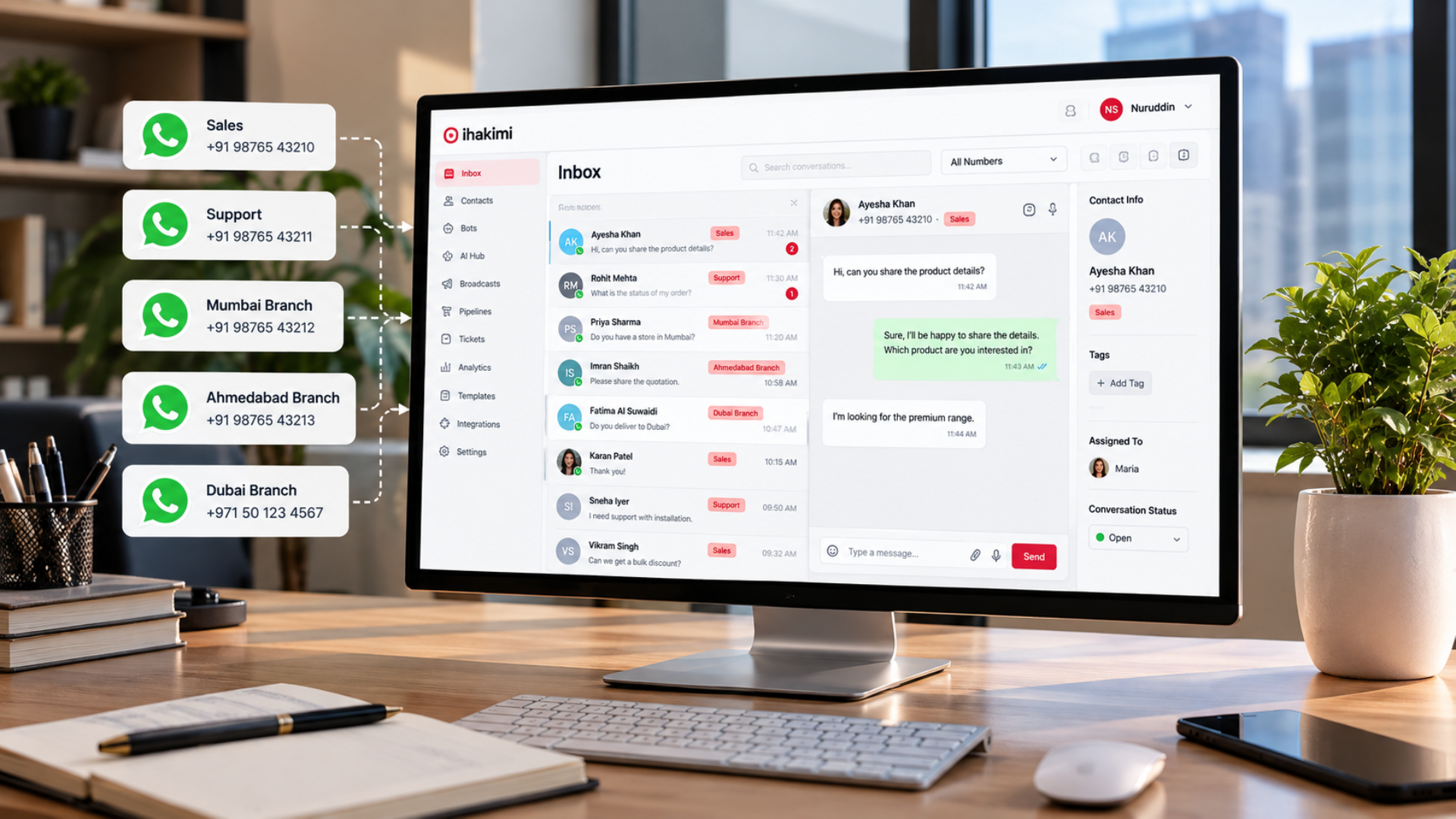
The concept is straightforward: instead of opening a separate inbox for every WhatsApp number, the business connects its eligible numbers to a system that brings their conversations into a shared workspace. For example, a company may operate three WhatsApp numbers:
- One for sales enquiries
- One for customer support
- One for its wholesale division
With a centralized inbox, messages received through these connected numbers can be viewed and managed from one interface. The business can still identify which WhatsApp number received each conversation. Employees can then respond through the appropriate connected number, subject to the platform’s configuration and permissions.
This does not mean that all WhatsApp numbers become a single phone number. Each number retains its own identity, while the management of conversations becomes centralized. The number of WhatsApp accounts that can be connected depends on the platform’s capabilities, the business’s WhatsApp setup, and applicable Meta requirements.
It is also important to understand that simply installing the WhatsApp Business app on multiple devices does not provide the same functionality as a dedicated multi-number inbox. A centralized communication platform is designed to provide additional capabilities such as conversation assignment, automation, team access, and reporting.
How Does a Centralized WhatsApp Inbox Work?
A centralized WhatsApp inbox acts as a common workspace for conversations received through connected WhatsApp Business numbers. When a customer sends a message to one of the business’s numbers, the conversation appears in the communication platform. Depending on the system’s configuration, the conversation may be assigned to a particular department, employee, or workflow.
For example, consider a company with branches in Ahmedabad, Mumbai, and Dubai. Each branch maintains a dedicated WhatsApp number because customers prefer contacting the location they are dealing with. Instead of requiring management to access three separate inboxes, the business can connect the supported numbers to a centralized system.
Messages from all three branches can then be managed through one interface while retaining information about the number through which each customer contacted the business. The Ahmedabad team can handle its own enquiries, the Mumbai team can manage its conversations, and the Dubai team can respond to customers contacting its number.
At the same time, authorized managers may be able to review communication activity across the connected numbers. The exact visibility and assignment options depend on the platform’s access controls and configuration. This approach helps businesses maintain separate customer-facing numbers without necessarily maintaining completely separate communication management processes.
How to Manage Multiple WhatsApp Business Numbers in One Inbox
Businesses planning to centralize their WhatsApp communication should begin by reviewing their existing numbers and understanding how they are used.
The objective is not simply to connect every number to a software platform. It is to create a practical system that reflects the organization’s communication structure.
- Step 1: Identify All Business WhatsApp Numbers: The first step is to identify the WhatsApp numbers currently used across the organization. Businesses should document which departments, branches, or employees use each number and what types of enquiries are received. For example, a company may discover that its sales and marketing departments use separate numbers, while individual branches maintain additional accounts. This assessment helps determine which numbers need centralized management and whether their current responsibilities are clearly defined. It is also useful to identify whether each number is currently registered through the WhatsApp Business app, the WhatsApp Business Platform, or another supported arrangement.
- Step 2: Review WhatsApp Business Platform Requirements: Businesses generally need a compatible WhatsApp Business Platform setup to connect their numbers to a centralized communication solution. Meta’s WhatsApp Business Platform supports business messaging through approved technical integrations and service providers. However, the registration and onboarding process depends on the existing status of each phone number. Some numbers may already be connected to the WhatsApp Business Platform, while others may be used exclusively through the WhatsApp Business app.
Supported coexistence arrangements may allow eligible businesses to use the WhatsApp Business app alongside a connected platform, but availability and functionality depend on Meta’s current requirements and the provider’s supported onboarding process. Businesses should therefore verify the eligibility and existing configuration of each number before attempting to connect it. They should also avoid assuming that disconnecting or migrating a number will automatically preserve every existing feature, message history, or application capability.
- Step 3: Connect the Numbers to a Compatible Platform: Once the requirements are understood, businesses can connect eligible WhatsApp numbers through the onboarding process supported by their communication platform. Depending on the provider, this may involve Meta authorization, selecting the relevant WhatsApp Business Account, verifying the phone number, and completing the necessary channel configuration. Each number should be connected according to the platform’s instructions.
After setup, businesses should confirm that incoming messages are received correctly and that authorized employees can respond through the intended number. Testing each connection individually is important because a successful connection for one number does not automatically confirm that every other number has been configured correctly.
- Step 4: Organize Conversations by Department or Branch: After connecting the numbers, businesses should define how conversations will be organized. For example, messages received through the sales number may need to reach the sales team, while messages received through the support number should be handled by customer service representatives. For multi-branch businesses, conversations may need to remain associated with the branch that received the enquiry. A centralized inbox should make it possible for employees to understand which number a customer contacted and which team is responsible for handling the conversation. Clear organization reduces confusion and helps businesses maintain the purpose of each customer-facing number.
- Step 5: Configure Conversation Assignment: Conversation assignment is an important part of managing multiple WhatsApp numbers. Businesses can establish rules for directing enquiries to appropriate team members based on factors supported by their communication platform. For example, sales enquiries may be distributed among available sales representatives, while support conversations may be assigned to a dedicated service team. Some platforms also support round-robin assignment, which distributes incoming conversations among selected employees according to configured rules. The appropriate assignment method depends on the business’s structure, employee responsibilities, and communication volume.
- Step 6: Test the Complete Customer Experience: Before relying on the new setup, businesses should test the entire conversation process. This includes sending messages to each connected WhatsApp number, verifying that conversations appear in the correct workspace, checking employee access, and confirming that replies are sent through the intended number. If automation is configured, businesses should also verify that the correct workflows are triggered for each number. Testing helps identify configuration problems before they affect actual customer conversations.
How to Assign WhatsApp Conversations to Different Teams
One of the main advantages of centralized WhatsApp management is the ability to organize conversations according to business responsibilities. For example, a company may have a sales department with five employees and a customer support department with three employees. When a customer contacts the sales number, the conversation can be routed to the sales team. When another customer contacts the support number, the enquiry can be directed to the support department.
Within each department, conversations may be assigned manually or through automated assignment rules. This can help businesses reduce uncertainty about who should respond to a particular enquiry. It can also support workload management by distributing conversations among team members rather than allowing all enquiries to accumulate with one employee. However, automated assignment should be configured carefully.
A round-robin system, for example, does not necessarily account for every employee’s availability, workload, or specialization unless those factors are explicitly supported and configured. Businesses should therefore choose assignment rules that reflect how their teams actually operate. For more complex requirements, different assignment workflows may be needed for separate numbers, departments, or enquiry types.
Managing Multiple Branches With Separate WhatsApp Numbers
Businesses operating across several locations often face a particular communication challenge. Each branch may have its own customers, employees, products, and operational responsibilities. Maintaining separate WhatsApp numbers can be useful because customers know which location they are contacting. However, business owners and senior managers may still want visibility into communication activity across all branches.
A centralized WhatsApp inbox can help address this requirement by bringing conversations from connected branch numbers into a common management environment. For example, a retail chain may maintain separate WhatsApp numbers for five stores. Each store can continue receiving customer enquiries through its dedicated number, while the business configures the platform to direct those conversations to the relevant branch employees.
Authorized managers may then review conversations, assignments, and reporting information according to the access permissions available in the system. This arrangement can support both local communication and centralized oversight. It is particularly useful when businesses want to maintain consistent customer communication practices without requiring every branch to use the same public WhatsApp number.
Can Businesses Use Different Automations for Different WhatsApp Numbers?
Yes, where supported by the communication platform, businesses can configure different automation workflows for different connected WhatsApp numbers. This is important because not every number serves the same purpose. For example, a business may use one WhatsApp number for new sales enquiries and another for customer support. The sales number may require an automated welcome message followed by questions about the customer’s requirements. The support number may need a different process that collects an order reference, identifies the issue, and directs the conversation to the appropriate support representative.
Similarly, a wholesale division may need to collect business details and order quantities, while a retail division may focus on individual product enquiries. Using the same automation for every number could create an unsuitable experience if the numbers serve different customer needs. Businesses should therefore consider the purpose of each number before designing its automation. Where the platform supports number-specific conditions, triggers, or workflows, automation can be configured to reflect these differences. The objective is to ensure that customers receive relevant assistance based on the number they contact.
How AI Can Support Conversations Across Multiple WhatsApp Numbers
AI can help businesses manage repetitive customer enquiries across their connected WhatsApp numbers, particularly when different departments receive similar questions. For example, customers contacting a sales number may ask about products, services, pricing procedures, or business information. Customers contacting a support number may ask about operating hours, service processes, or how to raise a request. An AI assistant can be configured to respond using approved business information and guide customers through suitable conversation flows.
However, businesses should consider whether the same AI configuration is appropriate for every number. A sales-focused assistant may need different instructions, information sources, and escalation rules from a support-focused assistant. For example, a customer contacting the support department should not automatically receive the same lead qualification questions intended for new sales enquiries. Businesses should also ensure that AI responses remain within the information available to the system.
If an assistant cannot reliably confirm stock availability, payment status, order progress, or other account-specific information, it should avoid inventing an answer and instead follow an appropriate verification or human handoff process. When configured correctly, AI can support consistent communication while allowing each WhatsApp number to retain its intended purpose.
How to Maintain Customer Conversation History Across Multiple Numbers
Customer conversation history is an important consideration when managing multiple WhatsApp Business numbers. A customer may contact different departments at different stages of their relationship with a business. For example, the customer may first enquire about a service through the sales number and later contact support after purchasing.
A centralized communication platform can make it easier to manage records and conversations across connected numbers, depending on how the system identifies contacts and organizes customer information. However, businesses should not assume that connecting multiple WhatsApp numbers automatically merges all conversations into one continuous history.
WhatsApp conversations are associated with the numbers involved, and a communication platform’s ability to link records across channels or numbers depends on its contact management capabilities. Businesses may need to configure contact identification, customer records, tags, or other supported features to organize related interactions.
Access permissions should also be considered. Not every employee necessarily needs visibility into every customer conversation, particularly when different departments handle sensitive or confidential information. The goal is to make relevant customer context accessible to authorized employees without creating unnecessary access to unrelated conversations.
Managing Employee Access and Permissions
As businesses add more WhatsApp numbers and employees, access management becomes increasingly important. A centralized inbox may allow several employees to work within the same communication environment, but businesses should define which conversations and administrative functions each employee can access. For example, a sales representative may need access to conversations assigned to the sales department, while a support manager may require broader visibility into customer service activity.
Branch managers may need access to their location’s WhatsApp conversations without necessarily viewing conversations from every other branch. Where supported by the platform, role-based permissions can help businesses organize these responsibilities. Access management also matters when employees change roles or leave the organization. Businesses should maintain a process for reviewing user permissions and removing access when it is no longer required. A centralized system can simplify administrative oversight, but only when permissions are configured and maintained appropriately.
How to Monitor Conversations Across Multiple WhatsApp Numbers
When several departments or branches use WhatsApp, managers often need to understand how communication is being handled across the organization. A centralized platform may provide reporting capabilities that help businesses monitor conversation activity across connected numbers. Depending on the system, relevant metrics may include the number of conversations received, employee assignments, response times, conversation statuses, and other engagement indicators.
For example, a business may discover that its sales number receives significantly more enquiries than its support number. Another business may find that one branch experiences higher message volumes during particular periods. This information can help management review staffing arrangements, assignment rules, and communication processes.
However, businesses should interpret reporting metrics carefully. A high number of conversations does not automatically indicate strong sales performance, and a fast response does not necessarily mean a customer issue has been resolved. Reports are most useful when businesses connect communication activity with clearly defined operational goals. The objective should be to understand how customer communication is managed and identify opportunities for improvement.
Important Things to Consider Before Connecting Multiple WhatsApp Numbers
Before moving several WhatsApp numbers into a centralized inbox, businesses should review both technical and operational requirements. One important consideration is the current registration status of each number. Businesses using the WhatsApp Business app should confirm whether their chosen provider supports the relevant onboarding method and whether app coexistence is available for their situation.
Another consideration is the number of WhatsApp Business Accounts involved. Businesses should understand which Meta business assets own their numbers and whether they have the necessary permissions to authorize connections. They should also review how the platform handles existing conversations, contact records, message templates, automation, and team access.
Costs are another factor. Depending on the provider and configuration, businesses may incur platform subscription charges, number-related fees, and applicable WhatsApp messaging charges. Businesses should verify the current pricing structure rather than assuming that adding multiple numbers will have the same cost across all providers. Finally, organizations should consider how customer communication will be managed after the numbers are connected.
Without clear departmental responsibilities, assignment rules, and access permissions, centralizing the inbox may not fully resolve the operational problems that existed before implementation.
Common Mistakes to Avoid When Managing Multiple WhatsApp Numbers
One common mistake is connecting several WhatsApp numbers without defining their individual purposes. If employees do not know which number serves which department or customer group, conversations may still be assigned inconsistently.
Another mistake is giving every employee unrestricted access to all conversations. Although centralized visibility can be useful for management, businesses should maintain appropriate permissions based on employee responsibilities.
Businesses should also avoid applying identical automation workflows to every number without considering the customer journey. A sales enquiry, support request, and wholesale quotation may require different information and handling procedures.
Failing to test the setup is another potential problem. Each number should be checked for incoming messages, outgoing replies, assignment rules, and automation behavior before the business relies on the configuration.
Finally, businesses should not assume that a centralized inbox automatically resolves every customer data or reporting issue. The effectiveness of the system depends on how contacts, conversations, workflows, and employee responsibilities are organized.
How ihakimi Helps Businesses Manage Multiple WhatsApp Business Numbers
For businesses managing several customer-facing WhatsApp numbers, having a centralized communication environment can make day-to-day operations easier to organize. ihakimi is an omnichannel customer engagement and automation platform that helps businesses manage customer conversations, configure workflows, and coordinate communication across supported channels. For organizations using multiple eligible WhatsApp Business numbers, ihakimi can support centralized conversation management through its connected channel setup.
Businesses can organize customer enquiries, assign conversations to team members, and use automation to manage repetitive communication activities. For example, a company with separate WhatsApp numbers for sales and support can configure workflows according to the purpose of each number, subject to the available channel settings and automation capabilities.
The sales department may use automated information collection to understand customer requirements, while the support department may follow a different process for handling existing customer requests.
ihakimi’s bot-building and AI capabilities can also support automated conversations, while human handoff allows employees to take over when direct assistance is required. Features such as conversation assignments, pipelines, tags, analytics, and team management can help businesses organize customer interactions according to their operational needs.
The exact setup depends on the number of WhatsApp accounts involved, their existing Meta configuration, and the capabilities supported by the selected integration method. By bringing communication and automation into a structured workspace, ihakimi helps businesses manage customer enquiries without requiring every department to operate through an entirely disconnected process.
Wrapping It Up
Managing multiple WhatsApp Business numbers is a common requirement for businesses with different departments, branches, or customer groups. Separate numbers can help organizations maintain dedicated contact points, but managing them through independent inboxes may create difficulties with conversation visibility, employee coordination, response management, and reporting.
A centralized WhatsApp inbox provides a way to organize conversations from multiple eligible numbers within a shared communication environment while maintaining the identity and purpose of each connected number. However, successful implementation involves more than connecting the accounts. Businesses need to understand their WhatsApp Business Platform requirements, define departmental responsibilities, configure appropriate conversation assignments, establish access permissions, and test their automation workflows.
They should also consider how customer information is managed and how communication performance will be monitored across teams. With the right structure, businesses can continue using different WhatsApp numbers for different purposes while improving how those conversations are managed internally. For growing organizations, the objective is not necessarily to reduce the number of customer-facing WhatsApp accounts. It is to make those accounts easier to manage, coordinate, and support as part of a consistent customer communication process.